26.3.2. lin_slave
26.3.2.1. Overview
This example demonstrates the basic functionality of HPM LIN peripheral in slave mode, including:
Support for LIN 2.2A protocol specification
Data transmission and reception in slave mode
Enhanced checksum mode support
Sleep and wakeup functionality
Bus idle timeout detection
Maximum 8-byte data transfer support
26.3.2.2. Operation Flow
Initialization Configuration
Initialize LIN pin configuration
Configure LIN clock to 20MHz
Configure interrupt priority
Initialize transmit data buffer
Main Loop Processing
Wait for master request
Execute operations based on received frame ID:
ID 0x31: Receive 8 bytes of data
ID 0x30: Transmit 8 bytes of data
Handle various events:
Transfer completion event
Wakeup event
Error event
Bus idle timeout event
Interrupt Handling
Process master data request
Handle transfer errors
Process bus idle timeout
Handle wakeup signal
Process transfer completion
26.3.2.3. Board Setting
This example requires the following hardware:
A LIN transceiver
A USB_LIN debugger (as master)
Connection cables
Please refer to Pin Description for specific board. Connect LIN transceiver MCU signal to LIN’s TX and RX on board, connect LIN transceiver LIN signal to USB_LIN debugger.
26.3.2.4. Running the Example
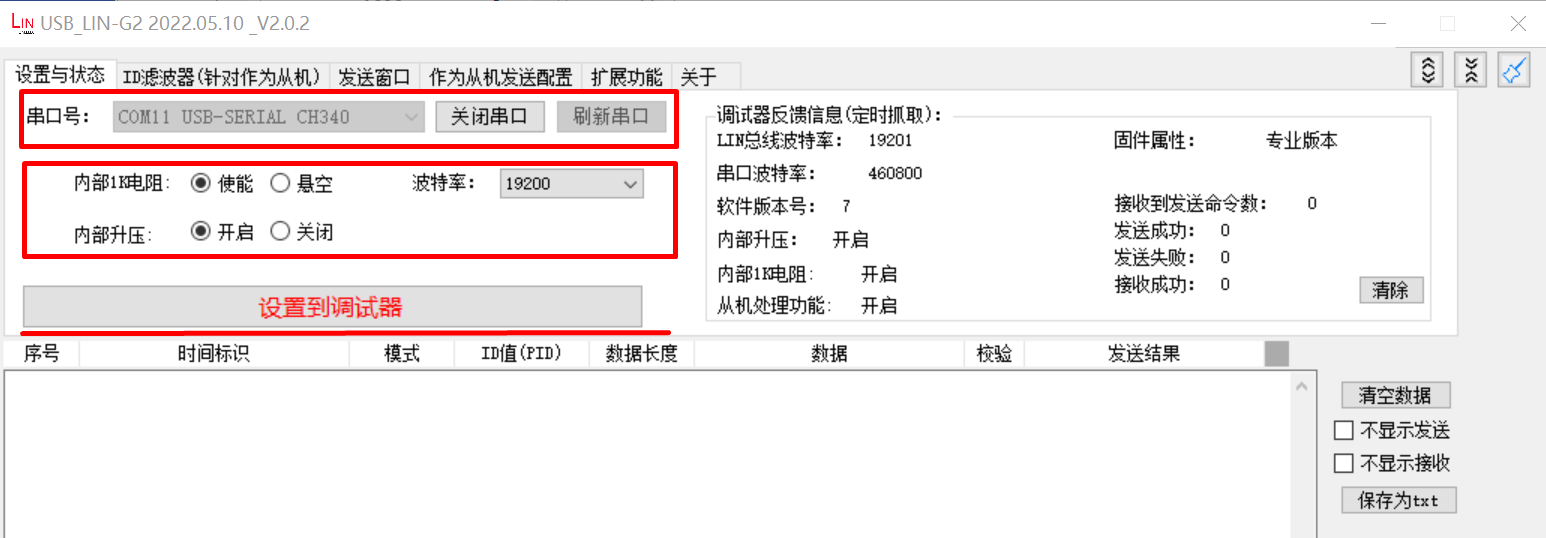
To run this program, USB_LIN debugger configuration is required:
Configure Basic Parameters
Select correct COM port and baud rate
Click “Set to Debugger” button
Configure Master Communication Parameters
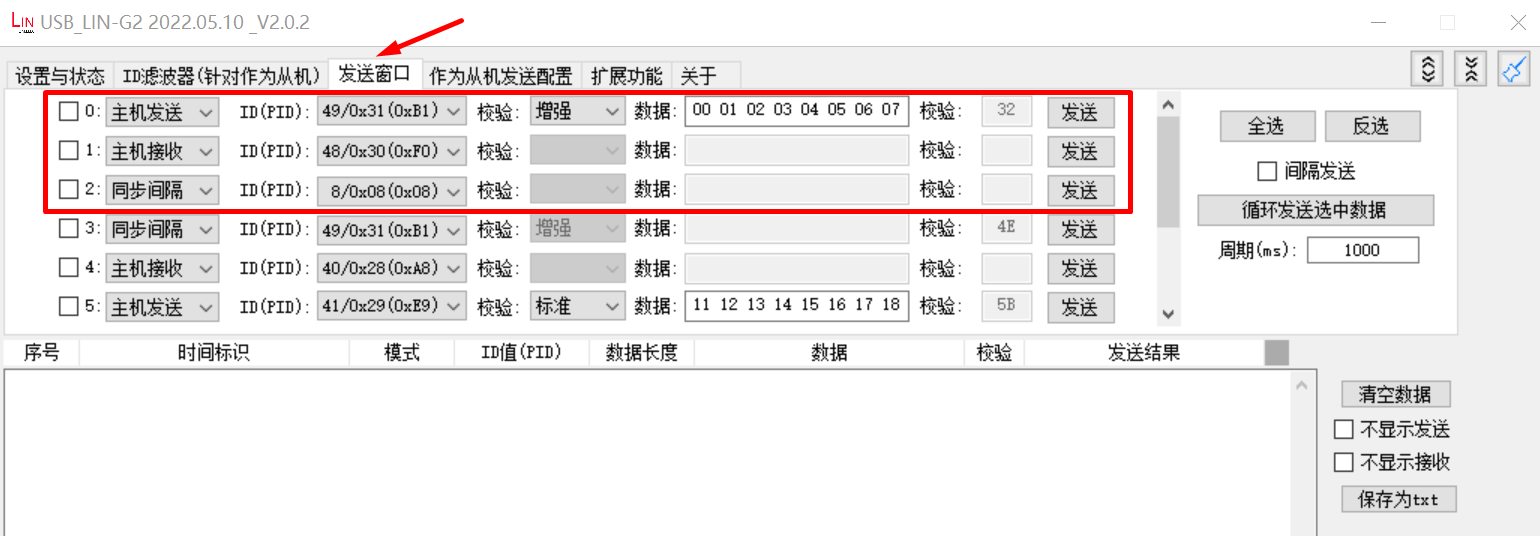
Configure transmission window parameters
Set master transmission and reception configuration
Set synchronization interval (for waking up slave from sleep mode)
Click “Configure to Debugger” button
When the example runs successfully, the log would be seen on the terminal like:
LIN slave example
LIN bus timeout, will enter sleep mode
LIN wakeup
ID: 31, receive 8 bytes
0 1 2 3 4 5 6 7
ID: 30, sent 8 bytes
7 6 5 4 3 2 1 0
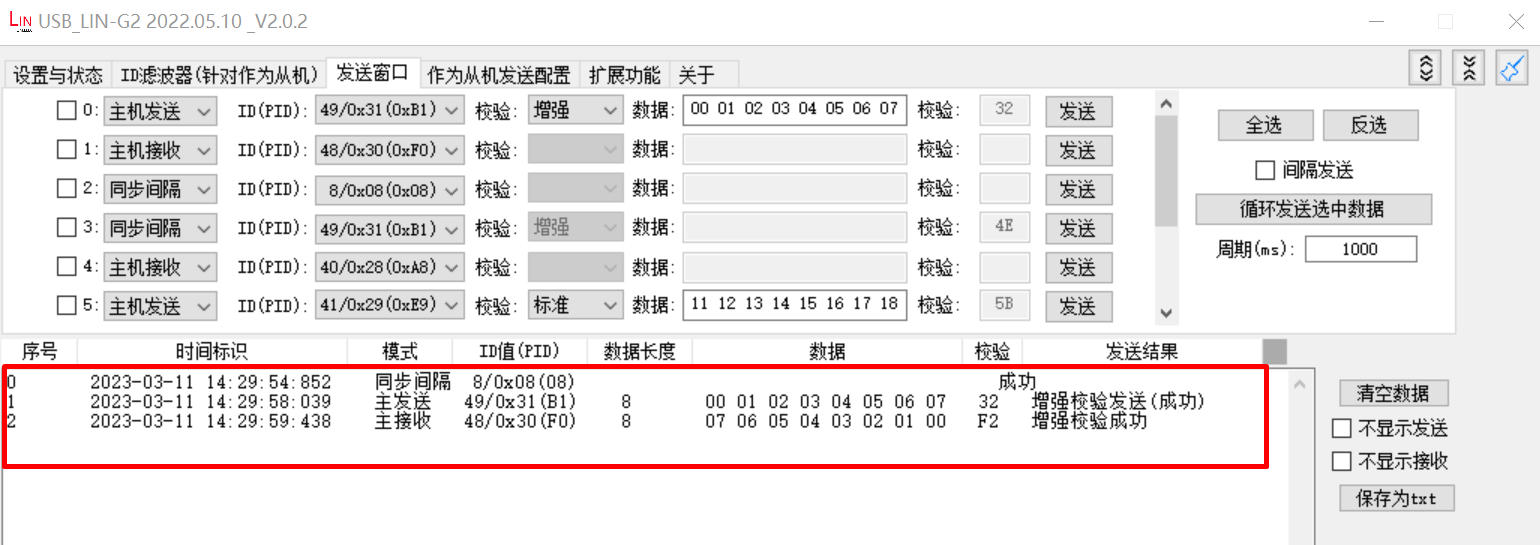
The debugger window will show the following result:
26.3.2.5. Debugging Tips
Hardware Connection Check
Ensure proper connection between LIN transceiver and development board
Check power and ground connections
Baud Rate Configuration
Ensure baud rate matches between master and slave devices
Default baud rate is 19200bps
Frame Format Issues
ID mismatch: Verify configured ID matches master’s transmitted ID
Verify checksum mode configuration matches
Common Error Analysis
Check if interrupts are triggered normally, examine status register to locate specific errors
Use oscilloscope to observe LIN bus signal waveform