43.4. USB HID Generic Inout
43.4.1. Overview
This example project shows USB hid generic transfers
PC transmits a HID report to MCU, and then MC send it back to PC
43.4.2. Board Setting
Connect a USB port on PC to the PWR DEBUG port on the development board with a USB Type-C cable
Connect a USB port on PC to one of USB port on the development board with a USB Type-C cable
43.4.3. Running the example
When the project runs correctly
Enter the relative path to “samplestinyusbdevicehid_generic_inout”
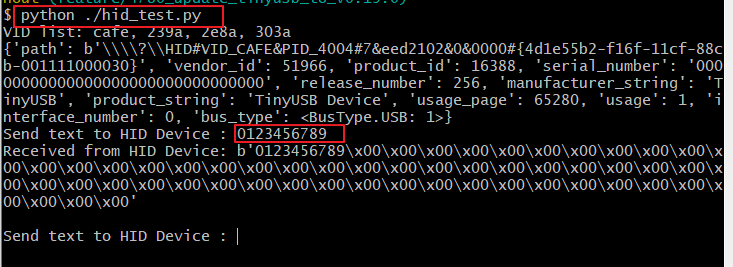
Run python ./hid_test.py
Note: Ensure that the hid package is installed. The steps are as follows:
Install hid package (https://pypi.org/project/hid/) by
$ pip install hid
hid package replies on hidapi (https://github.com/libusb/hidapi) for backend, which already available in Linux. However on windows, you may need to download its dlls from their release page and copy it over to folder where python is installed.
Enter the value in the terminal, and the hid device will reply with the received data. If it is less than 64 bytes, it will be padded with zeros.