3.21. MIDI
3.21.1. Overview
This example project shows MIDI demo
PC sees a MIDI device via Device Manager
3.21.2. Board Setting
Connect a USB port on PC to the PWR DEBUG port on the development board with a USB Type-C cable
Connect a USB port on PC to one of USB port on the development board with a USB Type-C cable
3.21.3. PC Synth Software
To test on PC, you need to install synth software.
Windows: MIDI-OX
Linux (Ubuntu): qsynth, qjackctl.
MacOS: SimpleSynth
3.21.4. Running the example
Taking Windows MIDI-OX as an example
Download the program and run. The computer can automatically recognize and enumerate a MIDI device.
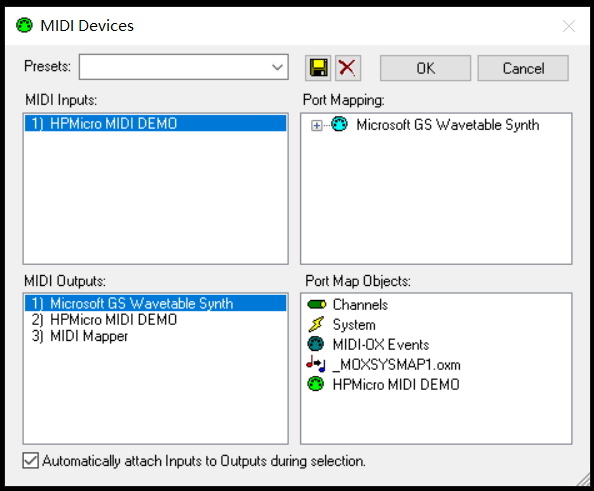
Open MIDI-OX Software, click menu “options-MIDI devices…”, MIDI Inputs select “HPMicro MIDI DEMO”,MIDI Outputs select “Microsoft GS Wavetable Synth”.
Uart console show log as follows, please select working mode: 1-auto play, 2-manual play。
    ----------------------------------------------------------------------
    $$\   $$\ $$$$$$$\  $$\      $$\ $$\
    $$ |  $$ |$$  __$$\ $$$\    $$$ |\__|
    $$ |  $$ |$$ |  $$ |$$$$\  $$$$ |$$\  $$$$$$$\  $$$$$$\   $$$$$$\
    $$$$$$$$ |$$$$$$$  |$$\$$\$$ $$ |$$ |$$  _____|$$  __$$\ $$  __$$\
    $$  __$$ |$$  ____/ $$ \$$$  $$ |$$ |$$ /      $$ |  \__|$$ /  $$ |
    $$ |  $$ |$$ |      $$ |\$  /$$ |$$ |$$ |      $$ |      $$ |  $$ |
    $$ |  $$ |$$ |      $$ | \_/ $$ |$$ |\$$$$$$$\ $$ |      \$$$$$$  |
    \__|  \__|\__|      \__|     \__|\__| \_______|\__|       \______/
    ----------------------------------------------------------------------
    CherryUSB midi device sample.

    ***********Select Work Mode**********
    1 - Auto Play
    2 - Manual Play

    Please Enter Play Number:
When select 1, this MIDI example send sequence of note (on/off) repeatedly, that realize automatic playing of piano keys, and users can listen to them through computer audio.
When select 2, this MIDI example send note (on/off) by pushing keybutton, that simulate pressing the piano keys, and users can listen to them through computer audio.