43.10. TINYUSB HOST MSC U DISK EXPLORER
43.10.1. 概述
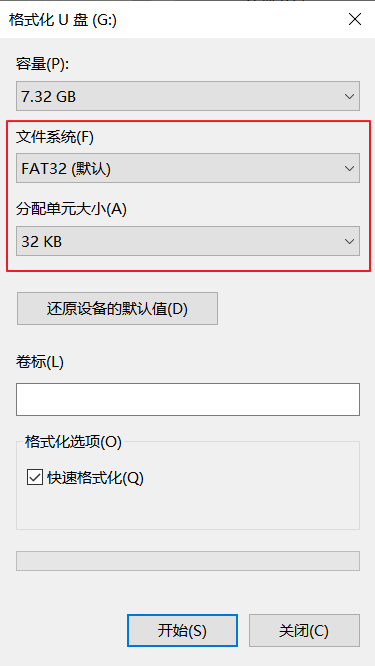
本示例工程展示U盘的访问操作(建议:U盘的格式化参数为FAT32/32KB)。
MCU作为文件管理器,在Console中可通过指令访问U盘,支持的指令如下:
* help
       Print list of commands
* cat
       Usage: cat [FILE]...
       Concatenate FILE(s) to standard output..
* cd
       Usage: cd [DIR]...
       Change the current directory to DIR.
* cp
       Usage: cp SOURCE DEST
       Copy SOURCE to DEST.
* ls
       Usage: ls [DIR]...
       List information about the FILEs (the current directory by default).
* pwd
       Usage: pwd
       Print the name of the current working directory.
* mkdir
       Usage: mkdir DIR...
       Create the DIRECTORY(ies), if they do not already exist..
* mv
       Usage: mv SOURCE DEST...
       Rename SOURCE to DEST.
* rm
       Usage: rm [FILE]...
       Remove (unlink) the FILE(s).
43.10.2. 硬件设置
使用USB Type-C线缆连接PC USB端口和PWR DEBUG端口
使用USB Type-C转USB-A线缆连接U 盘和开发板USB0端口或者USB1端口
43.10.3. 运行现象
当工程正确运行后,将显示U盘的信息:
TinyUSB Host MassStorage Explorer Example
A MassStorage device is mounted
IS917    innostor rev 1.00
Disk Size: 7500 MB
在console中输入回车,将出现 > 提示符,此时可进行U盘操作。输入help指令,将显示支持的指令列表。
输入help指令,将显示支持的指令列表:
>
> help
 * help
        Print list of commands
 * cat
        Usage: cat [FILE]...
        Concatenate FILE(s) to standard output..
 * cd
        Usage: cd [DIR]...
        Change the current directory to DIR.
 * cp
        Usage: cp SOURCE DEST
        Copy SOURCE to DEST.
 * ls
        Usage: ls [DIR]...
        List information about the FILEs (the current directory by default).
 * pwd
        Usage: pwd
        Print the name of the current working directory.
 * mkdir
        Usage: mkdir DIR...
        Create the DIRECTORY(ies), if they do not already exist..
 * mv
        Usage: mv SOURCE DEST...
        Rename SOURCE to DEST.
 * rm
        Usage: rm [FILE]...
        Remove (unlink) the FILE(s).
>
输入其他指令,可对U盘进行操作。